
If you’re using Windows 10 and don’t know how to set up a VPN, and you want to use a VPN without spending any money, then I’ll show you how step by step. I’ve done this many times myself, and connecting a VPN is quite easy.

So, in this guide, we’ll teach you how to connect a VPN on Windows 10, step by step, in simple terms. Let’s get started!
What is a VPN and how does it work?
VPN stands for Virtual Private Network. It’s a type of server that creates a secure connection between your computer and the internet. Without a VPN, your IP address, location, and sometimes even your online activity can be visible to your internet service provider.
However, when you use the internet with a VPN enabled, your real identity is hidden, and your data travels through a secure tunnel. This prevents anyone from knowing where you are accessing the internet from, which is why many people are using VPNs these days.
How to setup a VPN in Windows 10 (complete manual method)
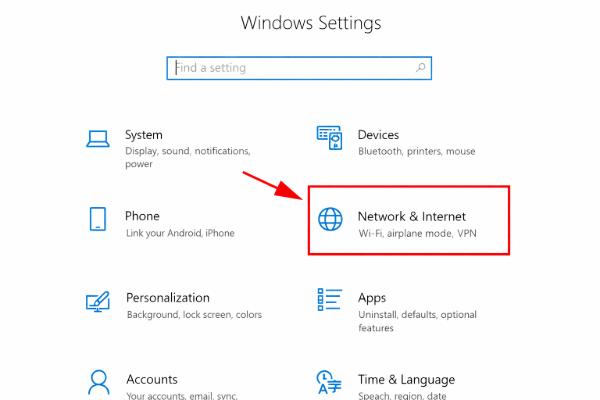
Now, the most important thing is that you don’t need any external software to set up a VPN in Windows 10 because Windows itself provides VPN support. First, you need to open your computer’s settings. There you will find a “Network & Internet” option; click on it. After that, you will see a VPN section; click on it.
Then, an “Add a VPN connection” option will appear. Here, you need to fill in some information about your VPN service. For the VPN provider, select Windows (built-in). After that, you can give your connection any name so that it’s easy to identify later.
Next, you will need to enter the server address. This address is provided by your VPN service. It’s usually best to leave the VPN type set to automatic. After doing all this, enter your username and password and save all the information. Once you’ve completed all these steps, your VPN profile will be created and ready to use.
Now, whenever you need to use a VPN, simply go to the VPN connections, click on the connection you want to use, and press the connect button. In just a few seconds, your VPN will connect, and you will be able to use the internet securely.
What things should you consider before setting up a VPN?
Setting up a VPN in Windows 10 isn’t very difficult, but it’s important to keep a few things in mind before you begin. For example, you’ll need a reliable internet connection. If you want to set up the VPN manually, you’ll need the details of a free VPN service, such as the server address, username, and password. If you already have all this information, setting up the VPN becomes even easier.
Is using a VPN safe or not?
Many users wonder if using a VPN is wrong. Let me tell you clearly that using a VPN is generally legal, as long as you are not using it for any illegal or unethical activities. Normal users use VPNs simply for their privacy and security, which is perfectly fine and legal.
- VPN tools
Why has a VPN become essential for Windows 10 users?
Currently, Windows 10 is one of the most widely used operating systems, and most people use it to access the internet. However, if you ever use public Wi-Fi at places like railway stations, hotels, or cafes, your personal data can easily be compromised. The risk of hacking is very high on such networks.
To avoid these problems, a VPN (Virtual Private Network) is used. A VPN secures your internet connection, preventing anyone from easily stealing your information. Additionally, many websites that are blocked in our country can be easily accessed with the help of a VPN. For all these reasons, a VPN is becoming essential for Windows 10 users.
How to check if the VPN is working correctly?
If you want to check if your VPN connection is working correctly, you can easily do so after connecting to the VPN. To check, simply search “What is my IP” on Google. If an IP address is displayed in the search results, it means your VPN is connected properly.
Conclusion
We have provided information above on how to connect Windows 10 to a VPN in simple terms. If you are a Windows 10 user and want to strengthen your online privacy and security, a VPN is a great option for you.
I hope you have learned how to connect your Windows 10 to a VPN with the help of this article. Please let us know in the comments what you thought of this article.